This demo converts MPEG-21 MCO Contracts to smart contracts in
Ethereum and Algorand and MPEG-21 CEL Contracts to smart contracts
in Ethereum and Tezos.
Select Technology
Click on CEL for Etehreum and Tezos Click on MCO for Etehreum and Algorand
Each MPEG-21 CEL/MCO Contract given as input in this demo can be
converted into an executable smart contract in three different
Distributed Ledger Technologies (DLT), namely Ethereum, Algorand and
Tezos. This smart contract, that it is referred to as Smart Contract
for Media, holds all the information regarding the MPEG-21 CEL/MCO
Contract. This includes a) the revenue percentages of each party
involved in the distribution of royalties, b) the DLT addresses
representing the parties in the contract and, c) the deontic
expressions related to the contract, e.g., permissions, prohibitions
or obligations, stored through Non Fungible Tokens (NFTs).
The demo is dvided in two parts: the Forward Conversion and the
Backward Conversion.
Forward Conversion
MPEG-21 CEL/MCO Contract to Smart Contract for Media Conversion
For the Forward Conversion from MPEG-21 CEL/MCO Contract to Smart
Contract for Media, the first window is used to show the MPEG-21
CEL/MCO template contract selected by using the buttons right above
the window. These contract templates are represented in the ISO/IEC
21000-20 (2nd Ed) Contract Expression Language (CEL) using the XML
format or in the ISO/IEC 21000-21 (2nd Ed) Media Contract Ontology
(MCO) using the RDF (Turtle) format. The templates can be edited
through the window.
Once the button "Convert to Media Contractual Objects" is clicked,
in the second window the Media Contractual Objects extracted from
the MPEG-21 CEL/MCO Contract will be displayed.
In the case of a conversion from an MPEG-21 MCO Contract, a third
window will display a Smart Contract Specification generated by
clicking the button “Prepare Smart Contract Specification”. The
Smart Contract Specification consists of a data structure containing
all the information needed as input for the Smart Contract for Media
deployment. Below this window, doughnut charts are displayed
representing data with respect to the revenue percentages of each
party involved in the distribution of royalties (e.g., splits).
Information about the deployment of the Smart Contract for Media in
the selected distributed ledger technology is also shown (section
4).
1) MPEG-21 CEL/MCO Contract template selection
2) MPEG-21 CEL/MCO Contract to Media Contractual Objects
3) Media Contractual Objects to Smart Contract Specification
Royalties Distribution
4) Deploy Smart Contract for Media
Ethereum
In the following, the Smart Contract for Media is deployed to the
Ethereum Ropsten network by using
Metamask.
The NFTs containing the MPEG-21 CEL/MCO Contract clauses are listed
in a unique registry found in a smart contract with address
0xAec959Fa5EbF6DCC505643502371e29D93C7a86b of the Ethereum Ropsten
test network.
In the following window the Smart Contract Template is displayed.
This template is used for the implementation of the Smart Contract
for Media. Above this window, the bindings between MPEG-21 CEL/MCO

Parties and Ethereum Addresses are also shown and can be edited.
Valid addresses in the Ethereum Ropsten test network are required as
input.
Finally, the Smart Contract for Media is deployed by clicking the
"Deploy Smart Contract" button. During this operation the necessary
NFTs are minted. The NFTs’ metadata are stored in IPFS and only the
IPFS Content Identifier (e.g., the metadata IPFS hash pointer) is
stored on the ledger. As a result of the successful Smart Contract
for Media deployment operation its DLT address is returned.
Ethereum
In the following the Smart Contract for Media is deployed to an
Ethereum private local network.
The NFTs containing the MPEG-21 CEL/MCO Contract clauses are listed
in a newly created registry for each deployment.
In the following window the Smart Contract Template is displayed.
This template is used for the implementation of the Smart Contract
for Media.
Algorand
In the following the Smart Contract for Media is deployed to an
Algorand private local network.
The NFTs containing the MPEG-21 CEL/MCO Contract clauses are listed
in a newly created registry for each deployment.
In the following window the Smart Contract Template is displayed.
This template is used for the implemention of the Smart Contract for
Media.
The Smart Contract for Media is deployed by clicking the "Deploy
Smart Contract" button. During this operation the necessary NFTs are
minted. The NFTs’ metadata are stored in IPFS and only the IPFS
Content Identifier (e.g., the metadata IPFS hash pointer) is stored
on the ledger. As a result of the successful Smart Contract for
Media deployment operation its DLT address is returned.
Tezos
The Smart Contract for Media is deployed to a Tezos test network
following the link:
Clicking the Play button marked 1 will execute the test scenario for
the contract in a sandbox environment. An overview of variable
evolutions and attempted operations can then be seen in the
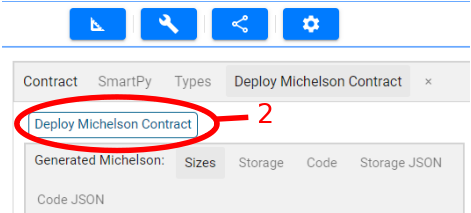
right-hand panel. In order to deploy the contract, one should click
on the Deploy Michelson Contract tab and click the button marked 2.
Within this new page, one can connect their wallet to deploy the
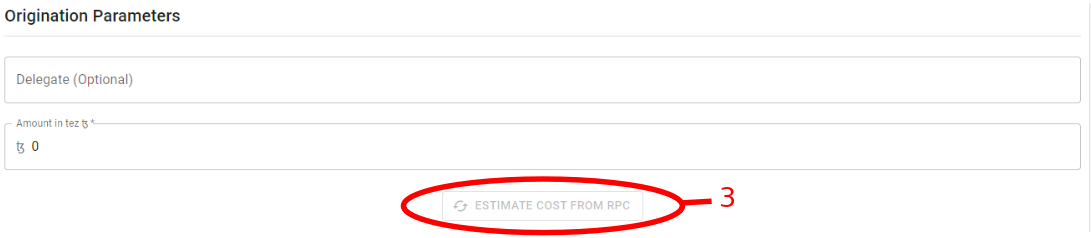
contract on the mainnet or a testnet. Estimating gas and storage can
be done using Estimate cost from RPC, marked 3.
Once deployed, a blockchain explorer such as
https://tzkt.io/
can be used to inspect everything contract related.
MPEG-21 CEL/MCO Parties and DLT Addresses Bindings
Smart Contract Template
Waiting for deploying contract...
Result:
Backward Conversion
Smart Contract for Media to MPEG-21 CEL/MCO Contract Conversion
In the Backward Conversion from Smart Contract for Media to MPEG-21
CEL/MCO Contract the following two input fields are used to provide
the information to retrieve the Smart Contract for Media. In the
case of a conversion to an MPEG-21 MCO Contract, a set of Media
Contractual Objects obtained from the Smart Contract for Media will
be displayed in the first window, after clicking the "Parse Smart
Contract for Media".
Finally, in the last window the MPEG-21 CEL/MCO Contract obtained
from the Smart Contract for Media after clicking "Convert to MPEG-21
CEL/MCO Contract" is displayed.
1) Smart Contract for Media to Media Contractual Objects
2) Media Contractual Objects to MPEG-21 CEL/MCO Contract